WhatsApp Business for E-commerce: Full Setup and Sales Automation Guide

If there is one channel that Indian online sellers consistently underestimate, it is WhatsApp. Most use it for ad-hoc customer queries, a few use it to send order confirmations manually, and almost none have built a systematic sales and automation workflow on top of it. That gap is a significant competitive opportunity, because WhatsApp is where your customers actually are, and it is the channel they trust more than email, more than SMS, and often more than a brand website they have never visited before.
India has over 500 million active WhatsApp users. When a customer messages your store on WhatsApp asking about a product, they are not browsing passively. They are one step away from a purchase decision. The quality of how you respond, how quickly, how accurately, and how helpfully, determines whether that person becomes a buyer or moves on to a competitor who made the experience easier.
This guide covers every layer of WhatsApp for e-commerce: the difference between WhatsApp Business App and the WhatsApp Business API, how to set up your business profile and product catalogue correctly, how to use automated messages and quick replies to handle conversations that consume your team’s time, how to run broadcast campaigns that do not get your number flagged as spam, how to accept payments within WhatsApp, and how to connect WhatsApp to your order management system so that the entire workflow from enquiry to delivery notification happens without manual intervention.
Whether you are just getting started with WhatsApp as a sales channel or looking to replace a patchwork approach with a structured system, this guide gives you the complete picture.
WhatsApp Business App vs WhatsApp Business API: Choosing the Right Tool
The first decision every e-commerce business needs to make is which version of WhatsApp Business to use. The two options serve very different scales of operation, and using the wrong one creates friction that compounds as your business grows.
WhatsApp Business App
The WhatsApp Business App is the free version available on Android and iOS. It gives you a business profile with your store name, address, website, hours, and a short description. You get a product catalogue where you can list up to 500 products with images, prices, and descriptions. You can set automated away messages and greeting messages, use quick replies for frequently asked questions, and apply basic labels to conversations to organize them by status such as new order, pending, or shipped.
This version works well for businesses handling fewer than 50 to 100 customer conversations per day. It runs on a single device, supports only one user at a time, and has no API access, which means you cannot connect it to your order management system, your CRM, or any automation platform. Every message is manual.
WhatsApp Business API
The WhatsApp Business API is the version that serious e-commerce operations use. It is not an app you download. It is an interface that connects WhatsApp to your business software through a third-party provider called a Business Solution Provider (BSP). Once connected, you can send automated messages triggered by order events, run multi-agent customer support where your entire support team handles conversations from a shared inbox, send bulk broadcast campaigns to opted-in customers, and integrate the entire WhatsApp channel into your order and CRM workflow.
The API version requires a paid BSP subscription. Providers like Interakt, Wati, AiSensy, and Gupshup are among the most widely used in India. Costs typically range from INR 2,000 to INR 8,000 per month depending on the number of conversations and features required, plus Meta charges for template message conversations above the free tier.
WhatsApp Business App vs API at a Glance
| Feature | Business App | Business API |
|---|---|---|
| Cost | Free | Paid BSP subscription |
| Number of agents | 1 device, 1 user | Unlimited agents, shared inbox |
| Automation | Basic auto-replies only | Full workflow automation |
| CRM and OMS integration | Not available | Available via BSP |
| Broadcast reach | Up to 256 contacts per list | Unlimited opted-in contacts |
| Best suited for | Under 100 conversations per day | 100 plus conversations per day |
Setting Up Your WhatsApp Business Profile Correctly
Whether you start with the App or the API, your business profile is the first thing customers see when they message you. An incomplete profile creates doubt at the exact moment you need to build trust. Set it up as carefully as you would your store homepage.
Business Profile Essentials
Your business name on WhatsApp must match your actual brand name. This is particularly important for the API version where Meta runs a verification process. Your profile photo should be your brand logo, clean and legible at small sizes. The business description should explain in two to three sentences what you sell and what makes your store worth buying from. Include your website URL, your physical address if you have one, and your business hours.
The business category selection matters because it affects how WhatsApp indexes your profile. For e-commerce operations, categories like Shopping and Retail, Clothing and Apparel, or Food and Grocery are the appropriate choices depending on your vertical.
Building Your WhatsApp Product Catalogue
The WhatsApp catalogue is one of the most underused features in Indian e-commerce. It allows customers browsing your WhatsApp profile to view products directly, share product cards in chat, and add items to an in-chat cart without leaving WhatsApp. For businesses selling a focused product range, this catalogue meaningfully reduces the friction between customer interest and purchase intent.
When building your catalogue, use the same product images you use on your website. Write descriptions that answer the most common pre-purchase questions: size, material, quantity, and usage. Price products correctly including GST so there are no surprises at checkout.
Getting the Green Tick Verification
The green tick next to your business name signals that Meta has verified your business as authentic. It requires a formal application through your BSP or directly through Meta Business Manager. You need a registered business, an active Meta Business Manager account, and typically evidence of your brand’s public presence such as media coverage or a verified social media profile.
The green tick is not essential to operate effectively on WhatsApp, but it reduces friction for first-time customers deciding whether to trust your business with their payment details.
Automated Messages That Handle Repetitive Conversations
The most time-consuming part of WhatsApp support for online sellers is answering the same questions repeatedly. What is the delivery time? Is this product available? Where is my order? A well-configured automation layer handles all of these without a human agent, freeing your team for conversations that require genuine judgment.
Greeting Message
The greeting message triggers automatically when a customer messages you for the first time or after 14 days of inactivity. A good greeting acknowledges the customer, gives them an immediate sense of what they can ask, and sets the expectation for response time. Keep it warm but informative. Something like: ‘Welcome to [Store Name]. You can browse our catalogue, check your order status, or ask us anything. We reply within [X] minutes during business hours.’
Away Message
The away message triggers outside your business hours. A clear away message that confirms receipt, states when you will respond, and offers the option to browse your catalogue or website while they wait maintains the conversation and reduces the chance they move on before you get back to them.
Quick Replies for Repetitive Questions
Quick replies are pre-saved responses you trigger with a keyboard shortcut during a live conversation. Set these up for every question you answer more than five times a day. Common quick replies for e-commerce include delivery timelines, return and refund policy, COD availability, size guide links, and tracking instructions. A team with twenty well-written quick replies handles double the conversation volume without doubling headcount.
Keyword-Based Auto-Responses on the API
If you are using the API version, you can configure keyword-triggered responses. When a customer sends a message containing ‘track’ or ‘where is my order’, the system automatically responds with tracking instructions and a shipment link. When they type ‘price’ or ‘cost’, they receive a catalogue link. This handles the majority of inbound queries without human involvement.
Want to Connect WhatsApp to Your Boomimart Store?
Order Notifications and Transactional Messaging on WhatsApp
Transactional messages are the category of WhatsApp communications that customers actively want to receive. Order confirmations, shipping updates, and delivery notifications on WhatsApp have open rates that email simply cannot match. Most WhatsApp transactional messages are read within three minutes of delivery.
The Five Key Transactional Touchpoints
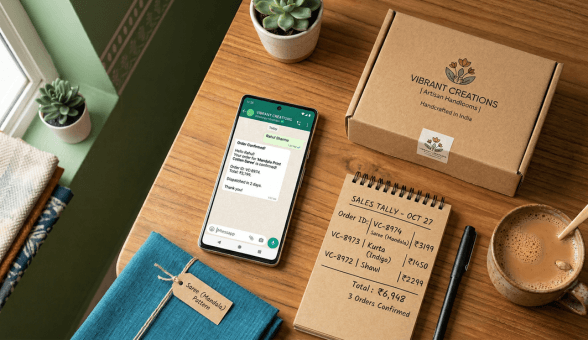
A well-designed transactional workflow covers five moments in the order journey. Order confirmation is sent immediately after payment, confirming order details and expected dispatch timeline. Dispatch notification is sent when the order ships, including courier name, tracking number, and a tracking link. Out-for-delivery alert is sent the morning the order is on its way to the customer, reducing failed delivery attempts. Delivery confirmation is sent after the order is marked delivered, with a request for feedback. Return and refund update is sent whenever a return is received and a refund is initiated.
Each of these messages requires a pre-approved template in the API version. Template approval through Meta takes between 24 and 72 hours. Templates that are clear, non-promotional in tone, and accurately describe the message purpose have the highest approval rates.
Connecting Notifications to Your Order Management System
The trigger for each transactional message should come from your order management system automatically. When an order is marked dispatched in your system, it should trigger the WhatsApp notification without any manual action from your team. Boomimart’s WhatsApp commerce integration is designed to enable exactly this connected workflow, where order status changes in the admin panel flow directly into WhatsApp notifications to the customer without manual intervention.
WhatsApp Transactional Message Sequence
| Trigger Event | Message Type | Timing |
|---|---|---|
| Payment confirmed | Order confirmation | Within 2 minutes of payment |
| Order dispatched | Shipping notification | At time of dispatch |
| Out for delivery | Delivery day alert | Morning of delivery day |
| Order delivered | Delivery confirmation | Within 1 hour of delivery |
| Return received | Refund update | Within 24 hours of return receipt |
WhatsApp Broadcast Campaigns That Generate Sales Without Getting Banned
WhatsApp broadcast is one of the most powerful and most misused tools in e-commerce marketing. Done correctly, it delivers promotional messages to opted-in customers with open rates above 70%, which no other channel matches in India. Done incorrectly, it results in your number being reported and potentially banned.
Building a Legitimate Opt-In List
Every customer on your broadcast list must have explicitly opted in to receive WhatsApp communications from your store. Collect consent at the point of purchase through a checkbox on your checkout page or a follow-up message after order confirmation that invites them to opt in for offers and updates. Importing your entire customer database and broadcasting without prior consent is a violation of WhatsApp’s Business Policy and the fastest route to getting your account restricted.
Build your opt-in list gradually and honestly. A list of 2,000 genuinely opted-in customers outperforms a list of 20,000 contacts who never asked to hear from you.
Campaign Types That Work
Restock alerts for previously out-of-stock and wishlisted products are among the highest-converting broadcast types. Price drop notifications for items a customer viewed but did not buy perform strongly. Festive sale previews sent to your highest-value customers 48 hours before a sale goes live create anticipation and reduce pressure to offer heavy discounts on the day itself.
The broadcasts that generate the strongest response rates are personalized to the customer’s name, timely and tied to a relevant moment, include a single clear call to action, and use a conversational tone rather than the language of a generic promotional email.
Frequency and Timing
Broadcasting too frequently is the most common way brands damage their WhatsApp channel. Customers who receive more than two to three promotional messages per week from the same brand start reporting them as spam. A sustainable broadcast frequency for most e-commerce brands is one to two per week. Messages sent between 10 AM and 12 PM and between 7 PM and 9 PM consistently generate higher open and response rates than those sent mid-afternoon or late at night.
Want to Connect WhatsApp to Your Boomimart Store?
WhatsApp Payments: Enabling In-Chat Transactions
WhatsApp Payments, powered by the UPI infrastructure, allows customers to complete a payment without leaving the WhatsApp conversation. This removes one of the most significant friction points in social commerce: the step where a customer must navigate away to a browser or payment app to complete a purchase.
Setting Up WhatsApp Pay for Your Business
WhatsApp Payments for businesses requires your WhatsApp Business account to be linked to a bank account through the UPI payment framework. Setup is done through the WhatsApp Business App settings under Payments. Once enabled, you can send payment request links directly in conversations. Customers complete payment using their existing WhatsApp Pay setup without entering additional credentials.
WhatsApp Pay supports transactions up to INR 1 lakh per transaction and per day. For higher-value purchases, direct customers to your website checkout or an alternate payment link. For the majority of consumer e-commerce transactions in India, this limit is sufficient.
When to Use In-Chat Payment vs Website Checkout
In-chat payment works best for conversational purchases where a customer has chatted with your team, confirmed their choice, and is ready to pay without navigating away. It is particularly effective for custom orders, pre-orders, and repeat purchases where the customer already knows what they want.
For first-time purchases from a new customer, directing them to your website checkout has advantages. It exposes them to your full product range, your reviews section, and your brand story, all of which contribute to completing a larger first transaction. The website checkout also captures customer details into your CRM, essential for building the long-term retention relationship.
In-Chat Payment vs Website Checkout
| Scenario | Recommended Approach |
|---|---|
| Repeat buyer, known product | WhatsApp Pay for speed and convenience |
| Custom or bespoke order | WhatsApp Pay after confirming all specifications |
| First-time buyer | Website checkout for trust building and data capture |
| Order value above INR 1 lakh | Website checkout or separate payment link |
Multi-Agent Support: Scaling WhatsApp Without Losing the Personal Touch
When your business grows beyond what one person can handle, you need a multi-agent setup where your entire support team accesses a shared WhatsApp inbox, can see all conversations, pick up threads, and hand them off without the customer knowing or caring which agent they are speaking to. This requires the API version and a BSP platform.
How a Shared WhatsApp Inbox Works
In a multi-agent setup, all incoming WhatsApp messages appear in a shared team inbox inside your BSP platform. Team members are assigned conversations either manually by a supervisor or automatically based on routing rules such as round-robin assignment, skill-based routing for technical queries, or priority routing for high-value customers. Each agent sees the full conversation history, the customer’s order details if integrated with your OMS, and any notes left by previous agents.
From the customer’s perspective, they always message the same number and receive seamless service regardless of which team member handles their conversation. The internal handoffs are invisible.
Agent Performance Metrics to Track
Once you move to a multi-agent setup, you gain visibility into metrics that help manage team performance. First response time measures how quickly your team picks up new conversations. Resolution time measures how long conversations take from first message to closure. Post-conversation satisfaction ratings give you qualitative feedback alongside quantitative data. Tracking these monthly and setting improvement targets creates accountability in your support function.
Using WhatsApp for Abandoned Cart Recovery
Cart abandonment is one of the most recoverable revenue losses in e-commerce. The average Indian online store loses between 60% and 75% of potential orders at the cart stage. Email recovery sequences have become less effective as inbox attention has fragmented. WhatsApp recovery messages, sent within an appropriate window and with the right tone, recover a meaningful share of these abandoned sessions.
The Recovery Sequence
A WhatsApp abandoned cart sequence typically consists of two to three messages sent at increasing intervals. The first message, sent one to two hours after abandonment, is a simple and non-pushy reminder that the cart is saved and the products are still available. The second message, if there is no response to the first, goes out 24 hours later and may include a subtle incentive such as free shipping or a time-limited offer. A third message, if used, goes out 48 to 72 hours later as a final reminder.
Tone matters more than almost any other variable. A message that says ‘Hi [Name], you left something behind. Want us to hold it for you?’ performs significantly better than one that leads with a discount percentage or manufactured urgency. The former feels like a helpful human, the latter feels automated.
Connecting abandoned cart recovery to your store’s data requires the same OMS integration described earlier. When your store records a cart as abandoned, that event triggers the recovery sequence automatically through your BSP. Boomimart’s automated order processing setup guide explains how to configure the store-side hooks that connect abandonment events to your WhatsApp automation, ensuring the sequence fires without manual monitoring of cart activity.
Post-Purchase Retention and Repeat Sales Through WhatsApp
The period immediately after a successful first purchase is the highest-leverage window for building a relationship that drives repeat buying. Customers who have just received their first order are at peak engagement with your product and your brand story. WhatsApp is the ideal channel for this moment because it is personal, immediate, and already associated with their positive purchase experience.
Post-Delivery Engagement Sequence
A post-delivery sequence starts with delivery confirmation and a genuine request for feedback. Not a generic review link, but a direct question: ‘How is [product name] working out for you? We would love to hear your thoughts.’ Customers who respond positively are then candidates for a review request. Customers who flag an issue get routed to support before they reach a public review platform.
Seven to ten days after delivery, a follow-up message providing genuine value related to the product, such as a usage tip, a care guide, or a relevant complementary product, continues the relationship without feeling like a sales push. This type of message consistently generates higher engagement than a promotional broadcast sent without context.
Loyalty and Repeat Purchase Triggers
Identifying the moment when a repeat customer is likely running low on a consumable and sending a timely reorder reminder on WhatsApp is one of the highest-converting retention tactics available to e-commerce brands. This requires knowing the typical consumption rate of your product and setting the reorder trigger at the right interval. Boomimart’s customer loyalty program guide covers how loyalty mechanics can be layered on top of WhatsApp-based engagement to create a retention system that compounds over time.
WhatsApp Post-Purchase Engagement Timeline
| Timing | Message Purpose |
|---|---|
| Day 0, delivery day | Delivery confirmation and genuine feedback request |
| Day 7 to Day 10 | Value message: usage tip or complementary product suggestion |
| Day 21 to Day 30 | Reorder reminder for consumable products |
| Day 45 and beyond | Loyalty reward or exclusive early-access offer |
Measuring WhatsApp Performance: The Metrics That Matter
Running WhatsApp as a sales and support channel without measuring its performance is the equivalent of running paid ads without checking ROAS. The data is accessible through your BSP dashboard, and using it consistently is what separates a channel that improves over time from one that stays static.
Key Metrics to Track Monthly
- Message delivery rate: percentage of messages successfully reaching customers. A low rate suggests list quality issues or template problems.
- Open rate: for broadcast campaigns, what share of delivered messages are opened. Healthy WhatsApp broadcast open rates are typically above 60%.
- Response rate: percentage of broadcast messages that generate a reply. This is a stronger signal of engagement quality than open rate alone.
- First response time: for support conversations, how quickly your team acknowledges an incoming message. Under two minutes is the standard during business hours.
- Cart recovery rate: percentage of abandoned cart messages that result in a completed purchase.
- Repeat purchase rate from WhatsApp customers: comparing retention among WhatsApp-engaged vs non-engaged customers shows the channel’s real contribution.
Compliance and Keeping Your Number Healthy
WhatsApp monitors business number quality continuously. High rates of messages being reported or blocked lower your quality rating, which eventually restricts your ability to initiate conversations. Maintaining list hygiene by removing opt-outs, keeping broadcast frequency reasonable, and writing messages that feel genuinely useful rather than promotional are the practices that keep your number in good standing. The Meta Business Help Centre provides current policy documentation on WhatsApp Business usage including template guidelines, opt-in requirements, and quality rating management, which is essential reading before scaling your WhatsApp operations.
WhatsApp as a channel for Indian e-commerce is not a nice-to-have. For businesses that get the setup right, automate the repetitive touchpoints, and use it with the discipline of any serious marketing and support channel, it becomes one of the highest-ROI investments available. The brands that build this foundation now will carry a meaningful advantage over competitors who continue to treat WhatsApp as an afterthought.