WhatsApp Commerce: The Complete Guide for Indian Business Owners

India has over 500 million WhatsApp users. That is not a statistic you read and move on from. That is the single largest concentration of active messaging users for any platform in any country in the world. Your customers are on WhatsApp right now. They are chatting with friends, sharing photos with family, coordinating with colleagues, and increasingly, they are buying products and services through conversations that feel nothing like traditional e-commerce.
WhatsApp commerce is not a future trend to watch. It is a present-day revenue channel that thousands of Indian businesses are already using to generate sales, recover abandoned carts, send order updates, run targeted promotions, and build customer relationships that no website or marketplace can replicate. The intimacy of a WhatsApp conversation, the near-100% message open rate, and the trust that comes from a personal chat experience make it the most powerful direct selling channel available to Indian business owners today.
Yet most small and mid-sized businesses are barely scratching the surface. They might use WhatsApp to share an occasional product photo or respond to customer queries, but they have not built a systematic commerce engine around it. This guide changes that. It covers everything from setting up your WhatsApp commerce infrastructure to building sales funnels, automating customer communication, recovering lost revenue, and measuring performance. Every strategy here is designed for Indian market realities and works seamlessly with platforms like Boomimart that offer native WhatsApp integration out of the box.
Why WhatsApp Commerce Works Better Than Almost Any Other Channel in India
To understand why WhatsApp commerce is so effective in India, you need to understand how Indian consumers actually behave online. Unlike Western markets where email is the primary digital communication channel, India skipped email for personal communication entirely. WhatsApp became the default layer for virtually all personal and increasingly business communication.
This creates several unique advantages for businesses selling through WhatsApp:
- Unmatched open rates. WhatsApp messages are opened 85% to 95% of the time, compared to 15% to 25% for email. When you send a promotional message on WhatsApp, the vast majority of your audience actually sees it.
- Conversational trust. A WhatsApp message feels personal. It sits alongside messages from friends and family, not in a promotional tab or spam folder. This psychological proximity creates trust that no display ad or email campaign can match.
- Instant two-way communication. Customers can ask questions, request specific products, negotiate (yes, this happens in Indian commerce), and get instant responses. This conversational selling process mimics the experience of walking into a physical store and talking to the shopkeeper.
- Rich media support. Share product photos, videos, catalogs, PDF brochures, location pins, and payment links in a single chat. The entire buying journey from discovery to payment can happen without leaving WhatsApp.
- Voice note ordering. For customers who find typing cumbersome, especially older demographics or those less comfortable with written communication, voice notes make ordering as easy as talking. This is uniquely powerful in India’s diverse, multilingual market.
Let us put this in perspective with a comparison against other marketing and sales channels:
| Channel | Open Rate | Click-through Rate | Conversion Rate | Cost per Message | Best Use Case |
| 85% to 95% | 15% to 25% | 8% to 15% | Rs 0.50 to Rs 1.50 (API template) | Order updates, cart recovery, personalized offers | |
| 15% to 25% | 2% to 5% | 1% to 3% | Rs 0.10 to Rs 0.50 | Newsletters, detailed content, promotional campaigns | |
| SMS | 90% to 98% | 5% to 10% | 2% to 5% | Rs 0.15 to Rs 0.30 | OTPs, urgent alerts, flash sale notifications |
| Push Notifications (App) | 40% to 60% | 8% to 15% | 3% to 8% | Free (requires app) | Daily deals, restock alerts, loyalty updates |
| Facebook/Instagram Ads | N/A (impression-based) | 1% to 3% | 1% to 4% | Rs 5 to Rs 30 per click | Brand awareness, new customer acquisition |
The data is clear. For Indian businesses, WhatsApp delivers the highest engagement and conversion rates of any direct communication channel. And when integrated with your e-commerce platform, it becomes a full-fledged sales and customer service engine.
WhatsApp Business App vs. WhatsApp Business API: Which Do You Need?
Before building your WhatsApp commerce strategy, you need to choose the right WhatsApp business tool. There are two distinct options, and the difference between them is significant:
| Feature | WhatsApp Business App (Free) | WhatsApp Business API (via Platform like Boomimart) | Winner for Growing Stores |
| Cost | Free | Platform subscription based (included with Boomimart) | API (better ROI at scale) |
| Product Catalog | Up to 500 products | Unlimited, synced with your store catalog | API |
| Automated Messages | Basic greeting and away messages | Full automation: order confirmations, tracking, cart recovery, promotions | API |
| Broadcast Limits | 256 contacts per broadcast list | Unlimited via approved templates | API |
| Customer Segmentation | Manual, limited | Segment by purchase history, location, behavior | API |
| Order Management | Manual tracking via chats | Integrated with e-commerce order system | API |
| Payment Collection | WhatsApp Pay (basic UPI) | Full payment gateway integration (UPI, cards, COD, wallets) | API |
| Multi-agent Support | Single device only | Multiple team members on same number | API |
| Analytics and Reporting | Basic message stats | Delivery rates, open rates, conversion tracking | API |
| Best For | Solo entrepreneurs, micro businesses | Growing stores with 50+ orders/day | Depends on stage |
If you are a solo entrepreneur or very early-stage business handling fewer than 20 to 30 orders per day, the free WhatsApp Business App gets you started. But the moment you need automation, unlimited broadcasts, multi-agent support, or integration with your e-commerce platform, you need the API.
Boomimart’s native WhatsApp integration connects directly to the WhatsApp Business API, giving you all the advanced capabilities without needing to manage the technical setup yourself. Order confirmations, shipping updates, abandoned cart messages, and promotional broadcasts all flow automatically through WhatsApp based on triggers in your store. Request a demo to see this integration in action.
Automate Your WhatsApp Sales Engine. Get a Free Boomimart Demo!
Building Your WhatsApp Commerce Funnel: From Discovery to Repeat Purchase
WhatsApp is not just a messaging tool. When used strategically, it becomes a complete commerce funnel that guides customers from first contact to purchase and beyond. Here is how each stage of the customer journey maps to WhatsApp tactics:
| Funnel Stage | WhatsApp Tactic | Message Example | Expected Impact |
| Awareness | Click-to-WhatsApp ads on Facebook/Instagram | ‘Hi! Tap here to explore our latest collection and get 10% off your first order.’ | 3x to 5x higher engagement than landing page ads |
| Discovery | Product catalog sharing via WhatsApp Status and broadcasts | Daily status updates showcasing new arrivals, deals, and bestsellers | 15% to 25% of viewers engage with catalog links |
| Consideration | Personalized product recommendations via chat | ‘Based on your last order of [Product], you might love [Related Product]. Want me to add it to your cart?’ | 20% to 30% conversion on personalized suggestions |
| Purchase | Direct checkout link sent via WhatsApp | ‘Your cart is ready! Complete your order here: [link]. Use code WHATSAPP10 for 10% off.’ | 12% to 18% higher conversion vs email |
| Post-Purchase | Automated order confirmation and tracking updates | ‘Your order #1234 has been shipped! Track it here: [link]. Expected delivery: Feb 20.’ | 60% reduction in ‘where is my order’ calls |
| Retention | Reorder reminders and loyalty offers | ‘Hi [Name]! It has been 30 days since your last grocery order. Ready to restock? Here is your repeat order link.’ | 25% to 35% repeat purchase rate |
| Recovery | Abandoned cart follow-up via WhatsApp | ‘You left some items in your cart! Complete your order in the next 2 hours and get free delivery.’ | 12% to 18% cart recovery rate |
The power of this funnel is that every stage reinforces the next. A customer who receives a helpful order tracking update via WhatsApp is more likely to open your next promotional message. A customer who gets a personalized product recommendation is more likely to make a repeat purchase. The trust builds with every interaction.
For a deeper understanding of how to capture and track each of these funnel stages with data, our guide on data layer tracking mastery for e-commerce explains exactly which events to track and how to use them for smarter marketing decisions.
Setting Up WhatsApp Commerce with Boomimart: Step by Step
Getting your WhatsApp commerce engine running with Boomimart involves a straightforward setup process. Here is how to go from zero to fully operational:
- Get a dedicated business phone number. Use a number that is exclusively for your business. Do not mix personal and business WhatsApp. If you already have a WhatsApp Business account, you can migrate it.
- Set up your WhatsApp Business profile. Add your business name, logo, address, operating hours, catalog link (your Boomimart store URL), and a compelling business description that includes your key value proposition and delivery areas.
- Connect WhatsApp to your Boomimart store. Through Boomimart’s admin panel, link your WhatsApp Business API. This enables automatic message triggers for order events.
- Configure automated message templates. Set up templates for order confirmation, shipping updates, delivery confirmation, abandoned cart recovery, and payment reminders. WhatsApp requires pre-approved templates for business-initiated messages, so submit them for approval during setup.
- Build your contact list organically. Add a WhatsApp click-to-chat button on your website, include your WhatsApp number on all packaging and receipts, and run click-to-WhatsApp ads on Facebook and Instagram to grow your subscriber base.
- Launch your first broadcast campaign. Start with a value-driven message to your existing customers. A new product announcement, a special discount, or a useful piece of content works far better than a hard sell for your first broadcast.
The setup process typically takes 1 to 2 days. Once configured, the automation handles the heavy lifting. You focus on creating great products and customer experiences while WhatsApp handles the communication at scale.
WhatsApp Message Templates That Drive Sales
The messages you send through WhatsApp directly impact your conversion rates, customer satisfaction, and brand perception. Poorly crafted messages feel spammy and get you blocked. Well-crafted messages feel helpful and drive action. Here is a template library covering every key communication touchpoint:
| Template Type | When to Send | Sample Message Structure | Key Rules |
| Order Confirmation | Immediately after payment | Thank you for your order! Order #[ID], Total: Rs [Amount]. Track: [Link] | Must include order ID and amount |
| Shipping Update | When order dispatched | Great news! Your order is on its way. Delivery partner: [Name]. Track: [Link] | Include tracking link |
| Delivery Confirmation | After successful delivery | Your order has been delivered! We hope you love it. Rate your experience: [Link] | Ask for review within 24 hours |
| Abandoned Cart Recovery | 1 to 2 hours after abandonment | You left [Product] in your cart. Complete your order now and get [Offer]: [Cart Link] | Include product name and incentive |
| Reorder Reminder | Based on purchase cycle (14 to 30 days) | Time to restock? Your favorites are waiting. Reorder in one tap: [Link] | Personalize with past products |
| Promotional Broadcast | During sales, festivals, new launches | Festival Sale is LIVE! Up to 40% off on [Category]. Shop now: [Link]. Valid till [Date]. | Must use approved template; include opt-out option |
| Feedback Request | 24 to 48 hours after delivery | How was your experience with [Store Name]? Reply with 1 to 5 stars. Your feedback helps us improve! | Keep simple, one-tap response |
| Payment Reminder (COD) | Before delivery attempt | Your order #[ID] is out for delivery. Please keep Rs [Amount] ready for cash payment. | Send 1 to 2 hours before delivery window |
A few universal rules for WhatsApp messaging: always personalize with the customer’s name and relevant order details. Keep messages concise because people scan WhatsApp messages quickly. Include a clear call to action with a direct link. And never send more than 2 to 3 promotional messages per week to avoid fatigue and blocks.
Automate Your WhatsApp Sales Engine. Get a Free Boomimart Demo!
WhatsApp for Abandoned Cart Recovery: Your Highest-ROI Tactic
If you only do one thing with WhatsApp commerce, make it abandoned cart recovery. This single tactic consistently delivers the highest return on investment of any WhatsApp strategy because it targets customers who have already demonstrated purchase intent. They picked your products. They added them to their cart. They just did not finish the transaction.
Here is why WhatsApp beats every other channel for cart recovery:
- Speed of delivery. WhatsApp messages arrive instantly and are typically read within minutes. An email might sit unread for hours or days. By the time most customers read a recovery email, they have already forgotten what was in their cart.
- Conversational response option. If the customer abandoned because of a concern (delivery charges, product question, payment issue), they can reply directly to your recovery message and get an answer. Try doing that with an email.
- Higher trust environment. Promotional emails often land in spam or promotions tabs. WhatsApp messages land in the same inbox as messages from friends and family, enjoying a halo of trust.
Boomimart’s abandoned cart module tracks every incomplete checkout and, when combined with the WhatsApp integration, automatically sends recovery messages at the optimal timing window. For a complete strategy on reducing cart abandonment across all channels, read our detailed guide on how to reduce cart abandonment and recover lost sales. And to understand the checkout design principles that prevent abandonment in the first place, explore our e-commerce checkout design mastery guide.
WhatsApp Catalog: Your Mobile Storefront Inside Every Chat
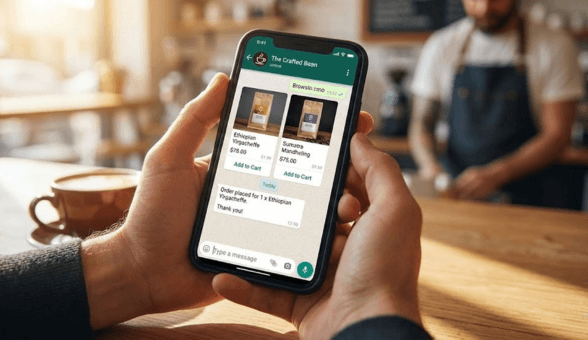
The WhatsApp product catalog feature turns your business chat into a browsable storefront. Customers can scroll through your products, see images, read descriptions, check prices, and add items to a cart without ever leaving WhatsApp. For many Indian consumers, especially those in Tier 2 and Tier 3 cities who may not be comfortable navigating traditional e-commerce websites, this is a game changer.
To build a catalog that converts:
- Use high-quality product images. The catalog thumbnail is often the first impression. Invest in clean, well-lit product photos. For guidance on product photography that sells, our article on design and development techniques to improve your product page offers actionable tips.
- Write concise, benefit-focused descriptions. You have limited space. Lead with the key benefit or differentiator. ‘Pure A2 Cow Ghee, 500ml, Made from Gir Cow Milk’ tells the customer everything they need in one line.
- Organize by collections. Group products into logical collections (Bestsellers, New Arrivals, Under Rs 500, Festival Specials) so customers can browse by interest rather than scrolling through your entire inventory.
- Keep pricing current. Nothing erodes trust faster than a customer inquiring about a product they saw at Rs 299 in the catalog only to be told it is actually Rs 399. Sync your catalog pricing with your store pricing.
When your WhatsApp catalog is powered by Boomimart, your product listings, pricing, and availability stay synchronized between your web store, mobile app, and WhatsApp catalog automatically. No manual updates, no pricing mismatches, no out-of-stock items showing as available.
WhatsApp Broadcast Strategies That Do Not Get You Blocked
Broadcasting promotional messages to your customer list is one of the most powerful ways to drive sales through WhatsApp. It is also the easiest way to get your number blocked by customers and flagged by WhatsApp if you do it wrong. Here are the rules of effective broadcasting:
- Only message customers who have opted in. This is both a WhatsApp policy requirement and common sense. Sending unsolicited promotional messages to people who did not ask for them will get you reported and eventually banned.
- Segment your audience. Do not send the same message to everyone. Segment by purchase history (repeat buyers vs one-time buyers), product category interest, location, or order value. A customer who buys organic groceries does not want to receive promotions about electronics accessories.
- Lead with value, not just discounts. Share useful content alongside promotions. Recipe ideas for grocery customers, styling tips for fashion buyers, maintenance guides for electronics. This positions your messages as helpful rather than purely commercial.
- Respect frequency limits. Two to three promotional broadcasts per week is the maximum most customers will tolerate. During festival seasons, you can increase slightly, but always monitor your block and report rates.
- Include an easy opt-out. Every promotional message should include a simple way for customers to unsubscribe. ‘Reply STOP to unsubscribe’ works well. Customers who want to leave but cannot will report you instead, which is far worse for your account.
- Time your messages strategically. In India, the best engagement windows are typically 10 AM to 12 PM and 6 PM to 9 PM. Avoid early mornings, late nights, and Monday mornings.
WhatsApp Commerce for Different Business Types
While the core WhatsApp commerce strategies apply universally, different business types can leverage specific tactics for maximum impact:
Grocery and Daily Essentials
Grocery is arguably the strongest use case for WhatsApp commerce in India. Customers order the same items repeatedly, prefer the convenience of messaging over browsing a website, and appreciate the personal touch of chatting with their local store. Set up repeat order shortcuts where a customer can simply send ‘Reorder last order’ and your system processes it automatically. Share daily deals via WhatsApp Status (free and visible to all contacts). Use broadcast lists segmented by dietary preference (vegetarian, organic, gluten-free) for targeted promotions. Read our comprehensive guide on building an organic products e-commerce website for more grocery-specific strategies.
Fashion and Lifestyle
Fashion thrives on visual discovery, and WhatsApp’s rich media capabilities make it perfect for showcasing new arrivals, styling lookbooks, and limited-edition drops. Share short video clips of products being worn or used. Create VIP broadcast lists for loyal customers who get early access to new collections. Use WhatsApp to handle size and fit queries in real time, reducing return rates. For fashion-specific e-commerce strategies, our guide on launching a successful online fashion boutique is an excellent resource.
Electronics and Gadgets
Electronics purchases often involve research and comparison. WhatsApp is ideal for answering pre-purchase questions that help close the sale: specifications, compatibility, warranty details, and EMI options. Send comparison charts via WhatsApp when customers are deciding between products. Follow up post-purchase with setup guides and accessory recommendations. Explore our guide on building a profitable online electronics store for more insights.
Home Decor and Gifts
Gifting and home decor benefit hugely from personalized recommendations. When a customer contacts you on WhatsApp saying ‘I need a gift for my wife’s birthday, budget around Rs 2000’, you can curate a selection instantly and share it as a mini catalog. This concierge-style selling creates premium customer experiences that drive loyalty and higher order values. For gift shop strategies, read our guide on turning gift ideas into profits with your online shop.
Integrating WhatsApp with Your Broader E-commerce Ecosystem
WhatsApp commerce works best when it is not an isolated channel but an integrated part of your entire e-commerce operation. Here is how WhatsApp should connect with your other business systems:
- Inventory sync. Products shared or sold via WhatsApp should deduct from the same inventory pool as your website and app sales. Boomimart’s unified inventory system handles this automatically, preventing overselling.
- Order management. WhatsApp orders should flow into the same order processing pipeline as website orders. No separate tracking sheets, no manual data entry. Boomimart’s admin panel provides a unified order dashboard across all channels.
- Customer data. Every WhatsApp interaction should enrich your customer profile. Purchase history, product preferences, communication preferences, delivery addresses. Boomimart’s CRM captures this data automatically from WhatsApp interactions.
- Payment processing. Payment links sent via WhatsApp should connect to the same payment gateway as your store, supporting UPI, cards, net banking, and COD.
- Analytics. WhatsApp campaign performance data should feed into your overall marketing analytics. Track which WhatsApp messages drive the most revenue, which segments respond best, and which message types get the highest conversion.
Automate Your WhatsApp Sales Engine. Get a Free Boomimart Demo!
Measuring WhatsApp Commerce Performance
You cannot improve what you do not measure. Here are the key metrics to track for your WhatsApp commerce operations:
- Message delivery rate: Percentage of messages successfully delivered. Should be above 95%. Low rates indicate phone number quality issues.
- Read rate: Percentage of delivered messages that are read (blue ticks). Expect 85% to 95% for WhatsApp. If significantly lower, your messages may be getting muted.
- Response rate: Percentage of messages that receive a reply. For promotional broadcasts, 5% to 15% is good. For service messages, expect higher.
- Click-through rate: Percentage of message recipients who click your links. Track separately for each message type (cart recovery, promotion, order update).
- Conversion rate: Percentage of WhatsApp interactions that result in a completed purchase. This is your north star metric.
- Revenue per message: Total revenue attributed to WhatsApp divided by total messages sent. Helps you calculate the ROI of your WhatsApp commerce investment.
- Block and report rate: Percentage of recipients who block or report your messages. Keep this below 2%. Above 5% risks account suspension.
- Cart recovery rate: Percentage of abandoned carts recovered via WhatsApp messages specifically. Compare to email and SMS recovery rates to validate channel effectiveness.
Boomimart’s analytics provide visibility into most of these metrics through the admin panel. For setting up advanced tracking across all customer touchpoints, our data layer tracking mastery guide covers the complete implementation process.
Common WhatsApp Commerce Mistakes to Avoid
- Spamming your contact list. The fastest way to get blocked and reported. Respect frequency limits and always provide value.
- Using personal WhatsApp for business. Mixing personal and business conversations creates confusion, lacks professionalism, and limits your ability to use business features.
- Not responding quickly enough. Customers expect near-instant responses on WhatsApp. If you cannot respond within 30 minutes during business hours, set up auto-replies with expected response times.
- Ignoring opt-out requests. When a customer asks to stop receiving messages, remove them immediately. Ignoring opt-outs violates WhatsApp policies and damages trust irreparably.
- Sending generic messages to everyone. Segmentation is not optional. A message about baby products sent to a customer who only buys electronics feels irrelevant and careless.
- Not integrating with your e-commerce platform. Running WhatsApp commerce separately from your main store creates data silos, inventory mismatches, and doubled workloads.
- Neglecting WhatsApp Status. Status updates are free, visible to all your contacts, and disappear after 24 hours (creating natural urgency). Use them daily to showcase products, share deals, and show behind-the-scenes content.
The Future of WhatsApp Commerce in India
WhatsApp commerce in India is still in its early growth phase, which means the businesses that invest now will have a significant first-mover advantage. Several developments on the horizon will make WhatsApp even more powerful as a commerce channel:
- In-app payments at scale. WhatsApp Pay is gradually rolling out UPI-based payments within the app. When widely adopted, customers will be able to browse, order, and pay without ever leaving the WhatsApp conversation.
- AI-powered chatbots. Automated conversational agents that can handle product recommendations, order status queries, and basic customer support 24/7 will make WhatsApp commerce scalable for even small teams. Read our AI chatbot comparison for customer support to understand the current landscape.
- Enhanced catalog and shopping features. WhatsApp continues to expand its shopping features, bringing more of the e-commerce experience directly into the messaging interface.
- Deeper platform integrations. Platforms like Boomimart are continuously deepening their WhatsApp API integrations, enabling more sophisticated automation, richer customer data capture, and tighter inventory synchronization.
For a broader perspective on where online shopping is headed, explore our article on the future of online shopping and 9 emerging trends to watch. And to understand how the D2C model is reshaping Indian e-commerce alongside channels like WhatsApp, read our analysis of why businesses are moving from B2B2C to D2C sales.
Your WhatsApp Commerce Action Plan: Start This Week
Here is a practical 7-day plan to get your WhatsApp commerce engine running:
- Day 1: Set up WhatsApp Business profile with complete business information and store link.
- Day 2: Connect WhatsApp API to your Boomimart store. Configure automated order confirmation and shipping update templates.
- Day 3: Build your WhatsApp product catalog with your top 20 to 30 products. Use best product images and concise descriptions.
- Day 4: Set up abandoned cart recovery automation. Configure the first recovery message to send within 1 hour of abandonment.
- Day 5: Add click-to-WhatsApp buttons to your website, add your WhatsApp number to all packaging and receipts, and update your social media profiles.
- Day 6: Send your first broadcast to existing customers. Start with a value-driven message: exclusive discount, new arrival announcement, or useful content.
- Day 7: Review initial metrics. Check delivery rates, read rates, and responses. Adjust messaging tone and timing based on early data.
WhatsApp commerce is not complicated. It is intentional. The businesses that succeed are the ones that treat WhatsApp as a strategic revenue channel, not an afterthought. With Boomimart’s native WhatsApp integration, the infrastructure is already built for you. All you need to do is plug in, configure your message flows, and start selling where your customers already spend their time.
Request a free demo and see how Boomimart can power your WhatsApp commerce strategy from day one.